Ardent Performance Computing
Latest Post
Zero autovacuum_vacuum_cost_delay, Write Storms, and You
A few days ago, Shaun Thomas published an article over on the pgEdge blog called [Checkpoints, Write Storms, and You]. Sadly a lot of corporate blogs don’t have comment functionality anymore. I left a few comments [on LinkedIn], but overall let me say this article is a great read, and I’m always happy to see someone dive into an important and overlooked topic, present a good technical description, and include real test results to illustrate the details.
I don’t have any reproducible real test results today. But I have a good story and a little real data.
Vacuum tuning in Postgres is considered by some to be a dark art. Few can confidently say: “Yes I know the right value for autovacuum_vacuum_cost_delay.” The documentation gives guidance, blog posts give opinions, and sooner or later, you start thinking, “Surely I can just set this one to zero – what’s the worst that could happen?”
My own story starts with some unexplained, intermittent application performance problems. We were doing some internal benchmarking to see just how far we could push a particular stack and see how much throughput a specific application could get. Everything hums along fine until suddenly – latency would spike across the board and the application would choke, causing backlogs and work queues to blow up throughout the system.
Where do you start when you have application performance problems? Wait Events and Top SQL – always! I’m far from the first person to evangelize this idea; I’ve said many times that wait events and top SQL are almost always the fastest way to discover where the bottlenecks are when you see unexpected performance problems. My [2024 SCaLE talk about wait events] gets into this.
So naturally I dug into the wait events and top SQL – and I noticed these slowdowns lined up perfectly with spikes in COMMIT statements on IPC:SyncRep waits. This wait event is not well understood. Last October I published an article [Explaining IPC:SyncRep – Postgres Sync Replication is Not Actually Sync Replication] with more explanation – but essentially it means the replicas were lagging behind and the primary was blocking on commit acknowledgments.
Notice how there are periodic spikes of hundreds of connections waiting on IPC:SyncRep for this system during the test runs: (nb. the plain colon represents CPU time)
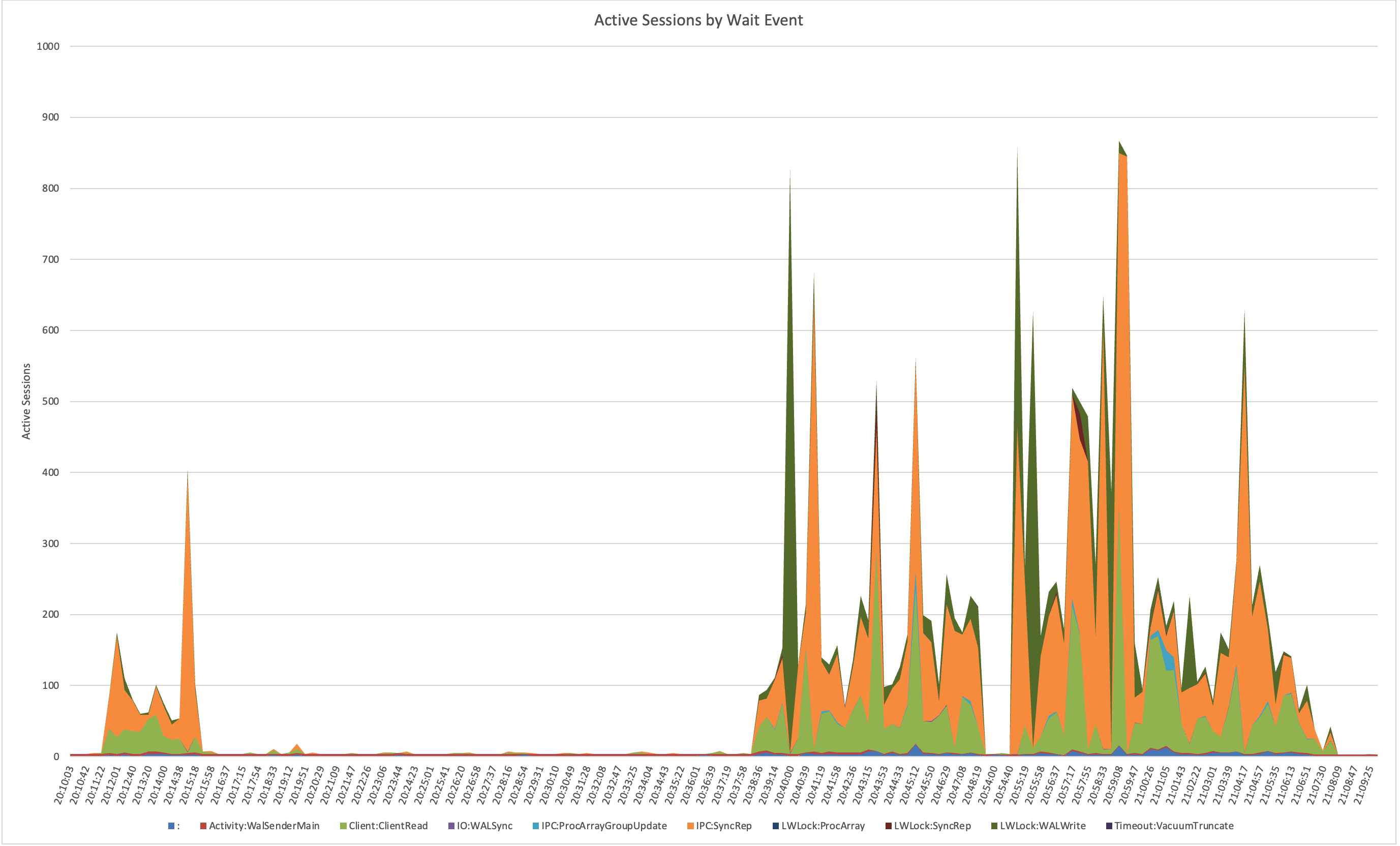
That led me to check network traffic, which showed corresponding bursts of traffic between the primary and replicas. Something was periodically creating giant spikes of WAL.
So, I went hunting in the WAL itself. Using pg_walinspect on Postgres 16, I broke down records by resource manager and found massive surges from XLOG; specifically from full-page image (FPI) writes. These weren’t steady; they came in waves and caused serious commit latency waiting for downstream replication.
Here’s a graph of the record_size and fpi_size bytes per resource type during two benchmark runs:
Subscribe

Disclaimer
This is my personal website. The views expressed here are mine alone and may not reflect the views of my employer.
contact: schneider @ ardentperf.com





 Ardent Performance Computing
Recent Comments